This topic contains recommendations for common multi-camera Vision use cases.
Use cases:
- Use Case 1: Two Cameras in Triggered Acquisition Mode
- Use Case 2: Two Cameras in Continuous Mode
- Use Case 3: Three or More Cameras in Continuous Mode
Use Case 1: Two Cameras in Triggered Acquisition Mode
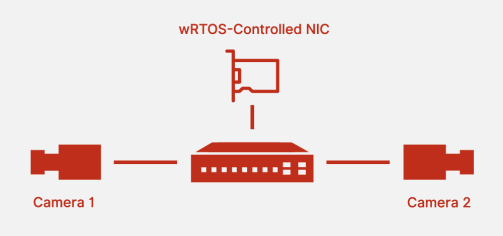
In this scenario, two cameras are configured for Triggered Acquisition mode (the camera does not send images until it receives a software or hardware trigger).
Best Practice
- Configure the trigger so the two cameras do not send images simultaneously.
- Connect a single wRTOS-controlled Network Interface Card (NIC) to both cameras via a switch.
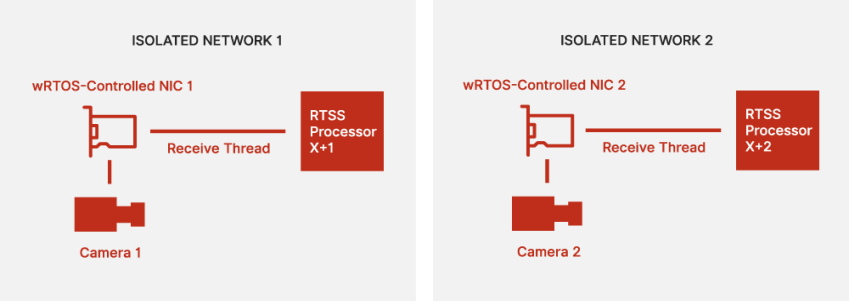
Use Case 2: Two Cameras in Continuous Mode
In this scenario, two cameras are configured for Continuous mode (continuous image acquisition is initiated by functions RtgvStartCameraStream or RtgvStartStream).
Best Practice
Assuming a low exposure time and reasonably large image sizes, the following configuration settings are recommended for maximum performance:
- Connect two wRTOS-controlled Network Interface Cards (NICs) to their respective cameras over isolated networks.
- Isolate the receive thread for each NIC on a separate CPU core.
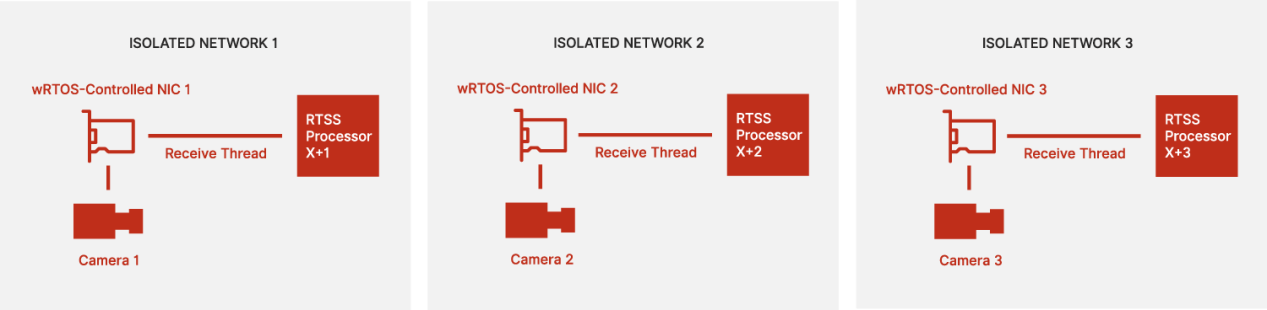
Use Case 3: Three or More Cameras in Continuous Mode
In this scenario, three or more cameras are configured for Continuous mode (continuous image acquisition is initiated by functions RtgvStartCameraStream or RtgvStartStream).
Best Practice
Assuming a low exposure time and reasonably large image sizes, the following configuration settings are recommended for maximum performance:
- 3+ wRTOS-controlled NICs (one per camera).
- Connect each NIC to a camera over isolated networks.
- Isolate the receive thread for each NIC on a separate CPU core.
- Increase the Maximum Transmission Unit (MTU) for each NIC.
Note: This step may require trial and error to determine the appropriate size.
- Increase the Packet Size property on each camera.