Processor Affinity
Having the ability to configure multiple dedicated RTSS processors introduces the concept of processor affinity. Processor affinity means you can specify which processor(s) a given process or thread should run on. This topic describes basic processor affinity concepts you should understand before you begin any parallel programming within wRTOS.
Affinity Levels
- Subsystem affinity
- Process affinity
- Thread affinity
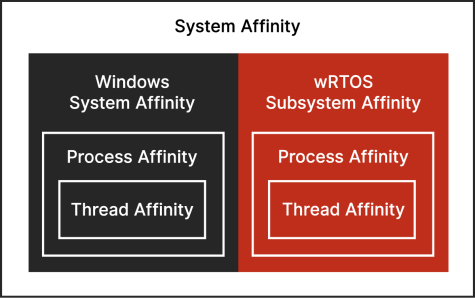
Subsystem affinity refers to the set of processors you have dedicated to RTSS.
Process affinity refers to the processors the threads of a given process may run on. You can set the default on the Core Configuration page in wRTOS Settings. The set of processors that a process's threads can run on must be a subset of the set of processors available to the RTSS subsystem.
Note: Proxy threads are run on the lowest-numbered RTSS core along with Subsystem activity for IPC communication. This may result in this core having higher latency than others.
Thread affinity determines the processors that an individual thread can run on. By default, a thread will run on the lowest-numbered RTSS processor available for the process to run on. The set of processors a thread can run on must be a subset of the set of processors its process can run on.
Processor Affinity Masks
Process and thread affinity are specified using processor affinity masks. A processor affinity mask specifies the set of processors on which a process or thread may run.
Ideal Processor
In wRTOS, you can set a thread’s ideal processor. When set, that is the processor the thread will always run on. wRTOS does not support load balancing, so this behavior deviates from how Windows handles setting an Ideal Processor. In Windows and other systems that do support load balancing, the ideal processor is the preferred processor for the thread and the system will try to run the thread on the ideal processor when possible, but it is not guaranteed. In wRTOS, use of the ideal processor is guaranteed.
Configuring Processor Affinity
When starting a process in wRTOS Task Manager, you can set the processor affinity mask for the process and the ideal processor for its main thread. If you are using the RtssRun command line, see Running an RTSS Application for details.
You can configure the Subsystem to set a default core on the Core Configuration page in wRTOS Settings. To do this, set a new value in the Change the default core combo box.
Related topics:
