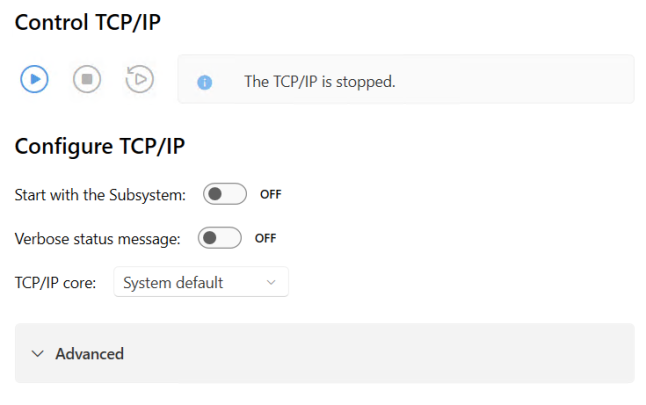
On the TCP/IP page in wRTOS Settings, you can control (start and stop) the TCP/IP component and configure its settings.
This component requires a license. TCP/IP is included in the wRTOS Basic Networking feature optionally installed with the wRTOS Runtime. However, to enable this feature, you must have a MaxRT wRTOS Basic Networking license (WNET64). Contact IntervalZero Sales to purchase licenses.
Note: Some settings require Windows Administrator privileges.
Note: You must restart the TCP/IP Stack for your changes to take effect.
In this section:
- Control TCP/IP
- Configure TCP/IP
- Configure Advanced General Settings
- Configure Advanced Stack Timer Settings
- Configure Advanced Maximum Concurrency Settings
 Accessing TCP/IP Settings
Control TCP/IP
Under Control TCP/IP, you can Start, Stop, and Restart the TCP/IP component. The TCP/IP status is displayed to the right of the controls.
Configure TCP/IP
Start with the Subsystem
You can set the TCP/IP component to start automatically with the Subsystem.
To change this setting:
Do one of the following:
- Set the toggle switch to OFF to require the TCP/IP component to be started manually. The Subsystem must be running before the TCP/IP component can be started.
- Set the toggle switch to ON (default) to automatically start the TCP/IP when the Subsystem starts.
Verbose status messages
You configure the TCP/IP component to provide status information at key points as it starts, runs, and shuts down. This can be helpful during development or when debugging an issue.
Note: Providing verbose status messages may affect TCP/IP performance during system shutdown.
To change this setting:
Do one of the following:
- Set the toggle switch to OFF to turn off verbose status messages.
- Set the toggle switch to ON (default) to provide verbose status messages.
TCP/IP core
By default, the TCP/IP component runs on the default RTSS core. You can change this by selecting a different TCP/IP core.
To change this setting:
Choose a core number from the drop-down list.
Configure Advanced General Settings
IP reassembly timeout
This setting configures the time-out interval, in seconds, on IP reassembly.
To change this setting:
Enter a new value in the text box within the range 1-120.
Maximum number of ARP entries
This setting configures the maximum number of ARP entries allowed by the TCP/IP Stack. Each ARP cache entry is 100 bytes. The default value is 256.
Note: We recommend this value be greater than the total number of devices with which the interface communicates. If this value is too small, the ARP cache can overflow. The potential for an overflow increases when most network devices are offline. When an overflow occurs, the TCP/IP Stack presents the warning message tfRtClone: ARP cache full, which indicates that the maximum number of entries should be increased.
To change this setting:
Enter a new value in the text box within the range 1-65535.
Maximum number of sockets
The TCP/IP Stack allocates actual socket memory when it creates a socket. This value defines the maximum number of sockets it must create. This value must be within the range of 1 to 32765. The default value is 64.
Note: In the running system, the socket range is 0 to the maximum number of sockets. For example, if the maximum number of sockets is set to 64, the range is 0 to 63.
To change this setting:
Enter a new value in the text box within the range 1-32765.
Configure Advanced Stack Timer Settings
Stack timer priority
Set the priority of the TCP/IP Stack's first real-time timer thread, which updates timer variables. This value must be in the range of 0 to 127, where 0 is the lowest priority, and 127 is the highest priority. The default priority is 66.
To change this setting:
Enter a new value in the text box.
Stack timer execute priority
Set the priority of the TCP/IP Stack's second real-time timer thread, which executes functions for expired timers. This value must be in the range of 0 to 127, where 0 is the lowest priority, and 127 is the highest priority. The default priority is 60.
Note: This value must be less than or equal to the Stack timer priority.
To change this setting:
Enter a new value in the text box.
Stack timer interval
The Stack timer is an internal timer used for all internal synchronization. The TCP/IP Stack requires a fixed-time notification for every Stack Timer Interval to update its elapsed time counters. Several protocols are implemented in the Stack, and dealing with individual timers would be challenging. Instead, the TCP/IP Stack is optimized to use a single notification for elapsed time. The Stack timer system manages all the timers used within the TCP/IP Stack.
This value must be within the range of 1 to 1000 milliseconds. The default value is 100 milliseconds.
Note: A lower value results in closely spaced interrupts and can adversely impact system performance.
Note: This value must be a multiple of the HAL timer period.
To change this setting:
Enter a new value in the text box.
Stack timer core
By default, the TCP/IP Stack timer runs on the default RTSS core. You change this by selecting a different TCP/IP core.
To change this setting:
Choose a core number from the drop-down list.
Configure Advanced Maximum Concurrency Settings
Maximum concurrency refers to the maximum number of threads that can run concurrently within the TCP/IP Stack. This value must be within the range of 0 to 10340.
When the TCP/IP Stack starts, it initializes attributes to allow a certain number of threads to run and provide services for each client that requests services. For example, running a client and a server application will require 1 concurrency each. The TCP/IP Stack running alone requires 1 concurrency to run the Loopback service. Loading and managing interfaces requires an average of 3 threads, thus a concurrency of 3 for each interface.
You can calculate this value automatically (recommended) or use a custom value.
Note: If the TCP/IP Stack requires more threads than the number prepared by the initialization process, the Stack may stop working.
To change this setting:
Choose a Maximum concurrency option:
- Select Calculate automatically (default) to prepare an expected surplus of resources based on the number of interfaces the TCP/IP Stack will manage.
- Select Custom to enter a custom value for the number of threads expected to run. If a custom calculation had been used previously, that value will appear in the text box. This value must be within the range 1-63.
The Historical Maximum value represents the historical maximum Stack semaphore usage. When No historical data is displayed, it indicates insufficient information to calculate a maximum.
How this Value Impacts Semaphore Initialization
If the Custom value is non-zero during semaphore initialization, the system calculates the minimum value and then uses the greater of these values:
- (MinValCalculation + 16(Constant for Min SemaphoreValue) )
- User Value
Note: If User Value is lower, and Verbose Mode is enabled, the following message will appear: The number of semaphores given by the current configuration (XXX) is too low and should be increased. Initializing YYY semaphores instead\n
RELATED Topics:
