wRTOS E-CAT Cable Redundancy
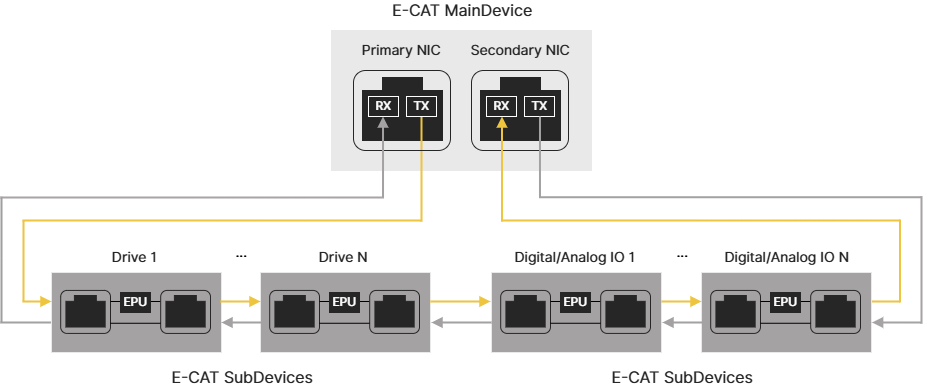
wRTOS E-CAT Cable Redundancy uses a ring topology to prevent communication failures when a cable is broken or unplugged. Each E-CAT SubDevice is connected to two others. The E-CAT MainDevice has two Network Interface Cards (NICs) to connect to the first and the last SubDevices, respectively. If the cable between any two SubDevices is broken, packets can still be transmitted.
Note: The wRTOS E-CAT Cable Redundancy function requires the wRTOS E-CAT Cable Redundancy license (WECR64). Contact IntervalZero Sales to purchase the license.
Note: To use E-CAT Cable Redundancy, the E-CAT MainDevice must have two NICs or a multi-port NIC to connect the MainDevice and SubDevices in a loop.
Packets Transmission
EtherCAT packets are transmitted differently depending on whether E-CAT Cable Redundancy is enabled.
- With E-CAT Cable Redundancy: When devices are connected in a loop, packets are transmitted from both Network Interface Cards (NICs) of the MainDevice, but only one NIC is effective. The primary NIC is the port that connects the MainDevice to the first SubDevice. The packet (Packet 1) sent from the primary NIC passes through the EtherCAT Processing Unit (EPU), which is the logic core of the EtherCAT SubDevice Controller (ESC) inside the SubDevice. The EPU receives, analyzes, and processes the EtherCAT data stream, carries data from the SubDevices, and returns it to the secondary NIC. The packet (Packet 2) sent from the secondary NIC doesn't pass through the EPUs or collect any data from the SubDevices. It is just being forwarded through the SubDevices. When Packet 2 returns to the primary NIC, it remains empty.
- Without E-CAT Cable Redundancy: When devices are not connected in a loop, packets are transmitted only from the primary NIC.
Use Cases
The following cases describe how E-CAT Cable Redundancy works when a cable is broken.
Case 1: Cable broken between two SubDevices
When a cable is broken between two SubDevices, the ports adjacent to the broken cable automatically close (Auto Close mode). Packets traveling toward the break won't proceed. Instead, they carry the existing data and return to where they come from. The SubDevices continue to receive packets from the MainDevice through either the primary or secondary NIC and operate normally. The SubDevices connected to the broken cable will switch their ports to Loopback mode once the disconnection is detected. These SubDevices may trigger an alarm or error upon detection, depending on the manufacturer's implementation.

Case 2: Cable broken between the MainDevice and a SubDevice
When a cable is broken between the MainDevice and a SubDevice, the ports closest to the break automatically close (Auto Close mode). Packets are transmitted from the other NIC of the MainDevice and are processed by the EPUs.

Case 3: Cable broken behind a coupler
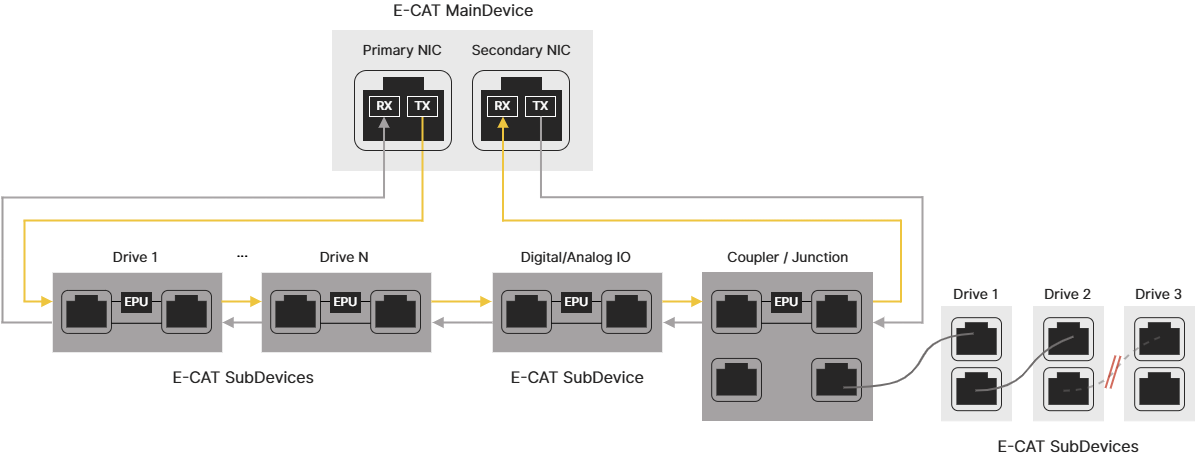
If SubDevices are connected through a coupler or junction, such as EK1122, they are not part of the redundancy ring. E-CAT Cable Redundancy doesn't apply to hardware behind the coupler. If a cable breaks in that segment, the affected SubDevices go offline.
When SubDevices Don't Immediately Detect a Broken Cable
If the cable breaks between two SubDevices, the SubDevice with the broken connection attempts to send packets, but the MainDevice will report that the packets are lost, and the packets sent from the MainDevice's secondary NIC won't be processed by the EPUs. To other SubDevices, it will appear as if they never received the packets. If this issue persists longer than 5 milliseconds, those SubDevices may trigger alarms.
If the cable between the MainDevice and a SubDevice is broken, the SubDevices will not receive the packets sent from the MainDevice. If this issue persists longer than 5 milliseconds, all SubDevices may trigger alarms.
