Processor Support
wRTOS Runtime extends the Windows operating system’s capabilities to deliver hard real-time performance on a 64-bit platform.
Windows Processor Enumeration
wRTOS supports multiprocessor-based systems running 64-bit Windows. wRTOS runs on an x64 platform, including Intel EM64T. The wRTOS RTSS exploits the features of SMP-compliant multiprocessor systems. This provides improved performance by allowing multiple threads to execute concurrently.
Multiprocessor systems with a maximum of eight processors that do not implement processor clustering use an 8-bit CPU ID to identify each processor.

Processor Clusters
Multiprocessor systems that provide support for more than eight processors, and those that implement processor 0 clustering, still use 8-bits to distinguish processors. However, the bits are used to assign each processor to a cluster group. This allows for a maximum of 64 processors.
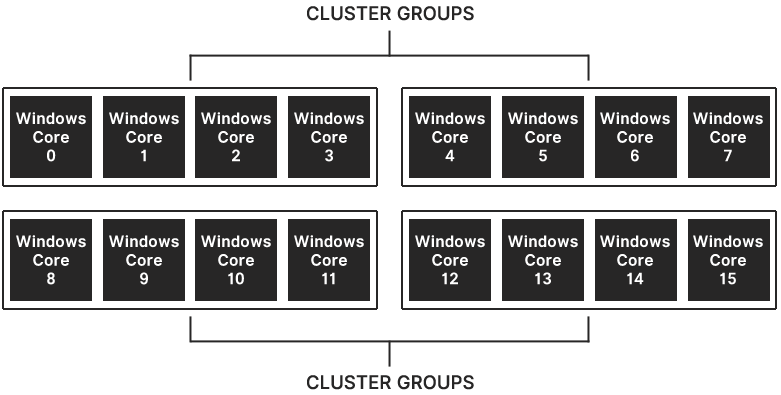
Although most systems with eight or fewer processors do not use cluster groups, some servers (such as those based on the Intel® Xeon® e5506 series processor) automatically force processor clustering.

wRTOS Processor Identification
Intel® Alder Lake introduced a new performance hybrid architecture that combines Performance-cores (P-cores) with Efficient-cores (E-cores). UEFI BIOS orders the active cores on the system from P-cores to E-cores; i.e., if you have 4 P-cores and 4 E-cores, the processor number of P-cores would be 0, 1, 2, 3 and the E-cores would be 4, 5, 6, 7. wRTOS statically partitions the number of processors between Windows and RTSS at system boot. Since Windows processors are assigned first, P-cores are allocated to Windows. Remaining P-cores and E-cores are then assigned to RTSS.
Note: wRTOS supports Control Flow Enforcement Technology (CET) in Intel® Alder Lake and Intel® Tiger Lake systems.
To optimize wRTOS performance on a hybrid architecture, you may want to run the HybridInfo utility, available from the Support Site, before you assign cores to wRTOS and Windows through wRTOS Settings. Based on the HybridInfo output, you may need to assign as few cores as possible to Windows to leave enough P-cores for RTSS.
Processor Configuration Mode
The wRTOS Subsystem schedules tasks to execute on its dedicated processors without any interference from the Windows operating system or Windows processes.
