Network Relay Settings
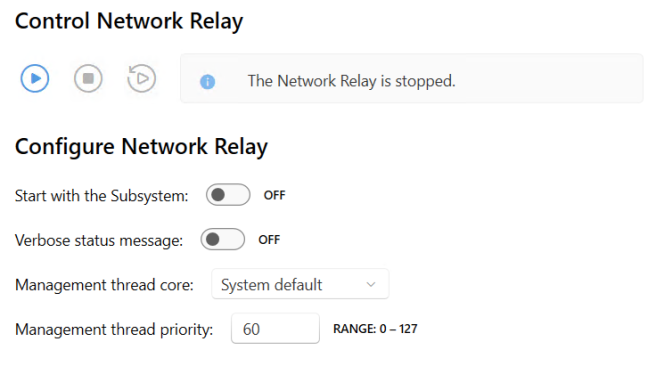
On the Network Relay page in wRTOS Settings, you can control (start and stop) and configure the Network Relay component.
Note: Some settings require Windows Administrator privileges.
Note: You must restart the Network Relay component for your changes to take effect.
In this section:
 Accessing Network Relay Settings

Control Network Relay
Under Control Network Relay, you can Start, Stop, and Restart the Network Relay component. The component’s status is displayed to the right of the controls.
Configure Network Relay
Start with the Subsystem
You can set the Network Relay component to start automatically with the Subsystem.
To change this setting:
Do one of the following:
- Set the toggle switch to OFF (default) to require the Network Relay component to be started manually. The Subsystem must be running before the Network Relay component can be started.
- Set the toggle switch to ON to automatically start Network Relay when the Subsystem starts.
Verbose status messages
You can configure the Network Relay component to provide status information at key points during its start, run, and shutdown. This can be helpful during development or when debugging an issue.
To change this setting:
Do one of the following:
- Set the toggle switch to OFF (default) to turn off verbose status messages.
- Set the toggle switch to ON to provide verbose status messages.
Management thread core
By default, the Network Relay component uses the System default core configured on the Core Configuration page. You can change this by selecting a different core.
To change this setting:
Choose a core number from the drop-down list.
Management thread priority
Set the priority of the Network Relay's management thread.
This value must be in the range 0 to 127, where 0 is the lowest priority and 127 is the highest. The default priority is 60.
To change this setting:
Enter a new value in the text box.
RELATED Topics:
